These FAQs refer to the Gold Standard Assurance PlatformQuick Links:
- Assurance Platform user guide
- Request accessSECTIONS
- What is the Gold Standard Assurance Platform and how does it work?
- Who needs to apply for access to the Assurance Platform?
- How do I book a review?
- What’s the workflow for a request?
- Are all documents uploaded into the Assurance Platform made public?
- Who has access to the Gold Standard Assurance Platform?
Accessing the Assurance Platform
- How do I gain access to the digital assurance platform?
- Does the platform allow for multiple users?
- Can an individual have multiple logins to access multiple Platform Accounts?
- Where can I locate my Registry Account Number?
- In which circumstances will Gold Standard send messages within the Assurance Platform in-platform messaging?
- How are project developers or VVBs notified of new messages in the Assurance Platform?
- Who closes the conversation? Can project developers or VVBs initiate a conversation?
- Who receives the 'unread messages' notification and when?
Assurance Platform function
What is the Gold Standard Assurance Platform and how does it work?
Following the launch of the SDG Impact tool and digital Measurement, Reporting and Verification (dMRV) pilot programme, the new assurance platform marks the next step in Gold Standard’s journey to fully digitalise impact certification.
From 05 December 2024, any new review of a project activity will be submitted to Gold Standard via this digital assurance platform. The platform facilitates efficient document management and workflows for projects going through the Gold Standard certification cycle. Through its interconnectivity with relevant stakeholders it supports more efficient decision-making , ensuring the entire assurance process is more transparent, efficient, and easier to navigate for all parties involved.
More information on this process and how the Assurance Platform works can be located in the Assurance Platform User Guide and demo.
Who needs to apply for access to the Assurance Platform?
The Assurance Platform is for projects that are applying our standard, Gold Standard for the Global Goals to certify climate and sustainable development impact. The platform facilitates efficient document management and workflows for projects going through the Gold Standard certification cycle. It is integrated with the Registry and is used to book and manage reviews/project documentation. Member organisations need to be developing Gold Standard projects to have access to this Platform.
How do I book a review?
The new online platform houses all the project documentation, and enables VVBs and expert reviewers to directly access all relevant information in one place.
Once all relevant project documentation has been uploaded, project developers and or VVBs can submit a request for review directly within the system – without a need for advance booking for review. The status of any request is viewable within the assurance platform. More information on this process can be located in the Assurance Platform User Guide and in the demo below:
What’s the workflow for a request?
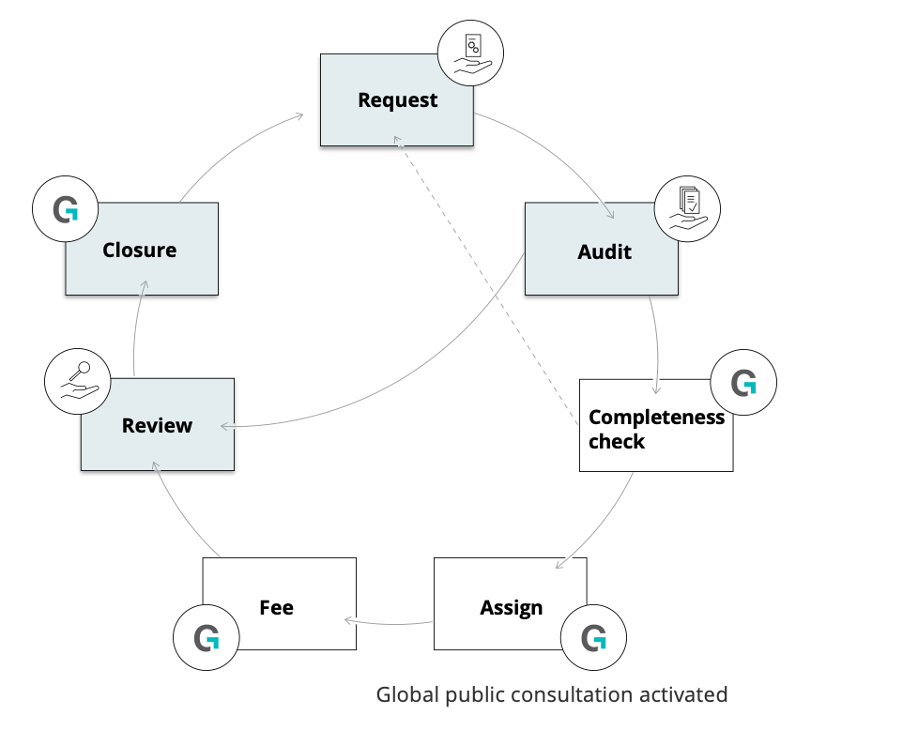
- REQUEST: A request is submitted
- AUDIT: Project developers will provide the VVB with the relevant documentation for the validation/verification audit. Once VVB has finalised audit, they will submit the documentation, including the final validation/verification report into the assurance platform,
- COMPLETENESS CHECK: A member of the Gold Standard Assurance Review Management (GS ARM) team will conduct a completeness check. If something is missing the GS ARM team will send a ‘request’ and the relevant documents will need to be submitted within 2 weeks.
- ASSIGN: If every thing is in order and all documents are there, the GS ARM team will assign a Gold Standard approved reviewer and initiate the global public consultation.
- FEE: And an invoice will be generated for the review. The review can start before payment is received. Findings will not be released until payment has been made.
- REVIEW: Quality check to ensure the accuracy, consistency, and compliance of project.
- CLOSURE: The review is closed and findings are shared with PD/VVB. If there are further requests for clarifications, these go straight to review with the same reviewer (bypassing “completeness check”, “assign” and obviously the “fee” steps).
Are all documents uploaded into the Assurance Platform made public?
No, documents that contain sensitive or confidential information can be marked as private within the platform.
Who has access to the Gold Standard Assurance Platform?
The Assurance Platform has been designed to enable relevant stakeholders (i.e. Project developers, VVBs, Reviewers, Gold Standard Staff and TAC) to participate in the process as per their role requirements.
An important feature to highlight in the platform design is that access and functions depend on the role and assignments – access will be granted only for those who have been assigned, only for what they have been authorised to view and only when it’s their time to see the information.
Accessing the Assurance Platform
How do I gain access to the digital assurance platform?
Project Developers, or their representatives, can request access to the Assurance Platform using this form. New submissions are being processed within 2-3 business days. On approval, you will receive an email with further instructions to reset password and access the system.
For users not already registered with other Gold Standard applications, you will receive an email requesting additional information, including the approval from your Impact Registry Account manager.
Companies that have not been through Gold Standard’s KYC/AML process will be requested to go through this. Organisations without a registry account shall be asked to apply for one.
For new project developers, a login will automatically be provided to the digital assurance platform on opening a registry account with Gold Standard.
More information on this process can be located in the Assurance Platform User Guide.
Does the platform allow for multiple users?
Yes, the platform allows for multiple users to access an account - each user should apply for access by filling out this online form.
Please note that access is given to the platform account rather than at a project level. This means all users can currently access all projects contained within an organisation's account.
Can an individual have multiple logins to access multiple Platform Accounts?
Yes, an individual can have multiple logins if they need to access Platform Accounts for multiple companies. If this is the case, please submit a user registration for each organisation that you require access for.
Please note that access is given to the platform account rather than at a project level. This means all users can currently access all projects contained within an organisation's account.
Where can I locate my Registry Account Number?
You can locate your registry account number in the upper right hand corner of the registry page, when you are logged in. If you've made a recent transfer or retirement of VERs, you will also find your account number detailed in the notification email.

In-platform messaging
In which circumstances will Gold Standard send messages within the Assurance Platform in-platform messaging?
In-platform messaging is used in the Assurance Platform for a direct communication channel between the Gold Standard ARM team, Project Developers and VVBs. Message history is saved on the Assurance Platform and available to Project Developers alongside all other project information and documents. This approach ensures all information relevant to a project's certification is accessible in one place.
The messaging function is used in the following scenarios:
- To provide feedback on:
- Completeness Check
- Preliminary Review updates
- To request missing information
- To send a reminder e.g. invoice payment
- To notify users of missing request(s) submissions in the case of grouped/batched requests
Please note that certification decisions are not communicated via message and will be shared in the relevant review forms and email notifications. Furthermore, if the project developer or VVB sends a message that is not related to the review request, they will be redirected to the helpdesk (help@goldstandard.org).
How are project developers or VVBs notified of new messages in the Assurance Platform?
Once the Gold Standard ARM Team initiates a chat, the project developer main contact and assigned VVB (if any) will be automatically notified via email about the open conversation on the Assurance Platform. Users can access the message by clicking ‘view active conversation’ button on the Assurance Platform request dashboard and may respond in the message box.
Who closes the conversation? Can project developers or VVBs initiate a conversation?
Conversations will be closed at the discretion of the ARM team and cannot be re-opened by the PD or VVB. The ARM team may re-open the chat if further information is required during the review. Once closed, messages cannot be shared, but users will be able to see the history of the conversation by selecting ‘view closed conversation’. Project developers or VVBs cannot initiate a new conversation.
Who receives the 'unread messages' notification and when?
An 'unread messages' notification is sent each day to the main contact for the project developer account detailing any messages on their projects which have not been seen by all users on the account.
For any remaining questions, please contact us at help@goldstandard.org.Was this article helpful?
That’s Great!
Thank you for your feedback
Sorry! We couldn't be helpful
Thank you for your feedback
Feedback sent
We appreciate your effort and will try to fix the article